Shopify orders.
ShipStation line items.
Review the difference.
Already export from both systems? Compare quantities by order ID + SKU across differently named columns. Review missing IDs and quantity differences, including split shipment rows, in a local HTML file.
Includes the standalone app, English guide and fictional sample files. Extract the purchased ZIP and open the HTML in a recent desktop Chrome or Edge browser. No installation, account or CSV upload needed to run the app. Payment and digital delivery use Lemon Squeezy.
A focused check for two export formats.
NO NATIVE INTEGRATIONThe Shopify Orders ↔ ShipStation Shipment Line Items preset maps order IDs, SKUs and quantities. Confirm that your exports include its required columns.
Group by order ID and SKU rather than comparing each row position. Multiple shipment rows contribute to the same total; any difference remains for human review.
The purchased HTML processes CSV/TSV files locally, without uploading their contents. Download the findings CSV and check it against the original records.
Is it the right tool for your workflow?
Useful when you already have a Shopify Orders CSV and a ShipStation Export Shipment Line Items CSV and want an independent order + SKU quantity comparison. This is not ShipStation’s Export Shipments template.
For simple row or cell differences, a free general CSV comparison tool may be enough. This product’s focus is different header mappings and grouped order-line quantities. It does not replace either platform’s dashboard or verify shipment, address validity or delivery.
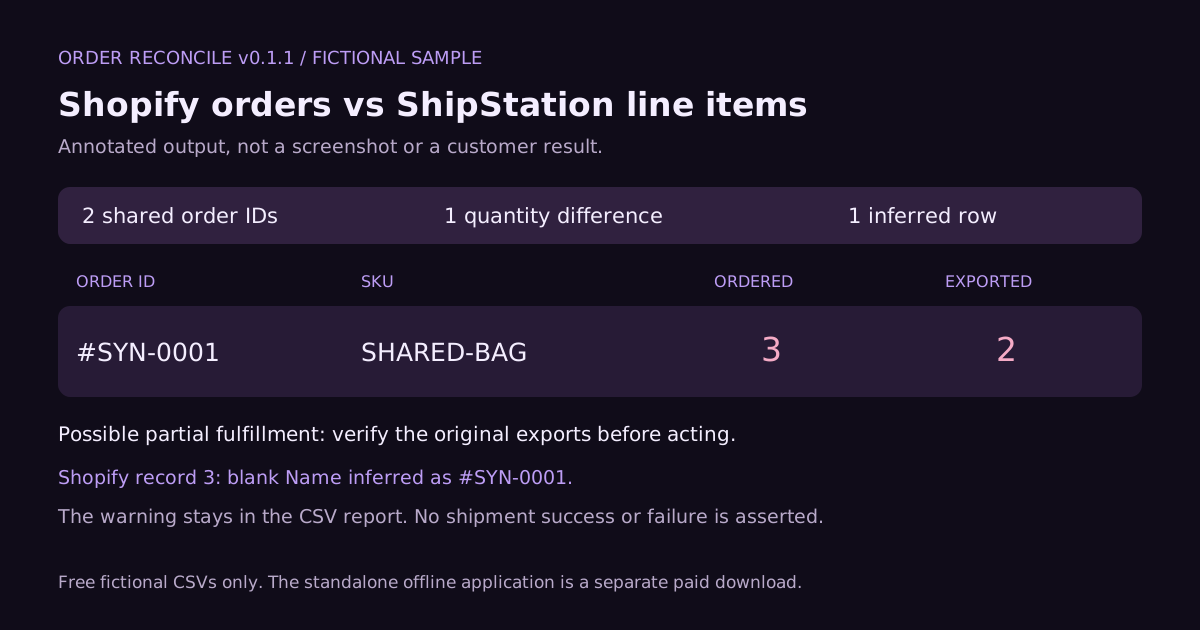
| ORDER ID | SKU | ORDER QTY | SHIPMENT QTY | REVIEW |
|---|---|---|---|---|
| #SYN-0001 | SHARED-BAG | 3 | 2 | Quantity difference |
| #SYN-0002 | SHARED-BAG | 2 | 2 | Equal export totals |
The pair also has a blank Shopify Name on a continuation item row. Explicitly enabling Shopify continuation mode infers #SYN-0001 and produces one review warning, alongside one quantity difference. A matching total means these export values agree; it does not confirm physical shipment or delivery.
Use these small, fictional files to inspect the columns and expected findings in the guide or your spreadsheet. The sample report is generated from the tested example. The paid application is not included in these downloads.
Buyer FAQ
What do I receive?
Order Reconcile v0.1.1 as a downloadable ZIP: an offline HTML utility, English setup and user guides, fictional sample files, and buyer terms. The one-time license covers the purchaser’s own internal order/fulfillment reviews, with no per-use fee or time limit.
Will my exports work?
CSV and TSV are supported, with a 5 MB limit for each file. Use a recent desktop Chrome or Edge browser. The preset expects Shopify Orders and ShipStation Shipment Line Items columns; other export schemas may need manual mapping or may be unsupported. Check the required columns and sample first.
How are split shipments and voided labels handled?
Shipment quantities are summed by order + SKU. Voided rows can be excluded with an explicit option and are flagged for review; unknown or empty Voided values stop that filter. Shopify blank-name inference is also opt-in and flagged. Partial shipments, cancellations and export windows still require operator judgment.
What does it not do?
It does not connect to Shopify, ShipStation or carriers, create labels, validate addresses, certify delivery, automatically correct records or guarantee detection of every discrepancy. Compare the same order scope and time window and verify findings before shipping or financial decisions. No official platform partnership is claimed.
How are my files handled?
The delivered app runs offline and does not transmit imported CSV contents. This landing page does not accept CSV uploads. For support, send only a problem description and redacted or fictional examples; never send customer names, addresses or actual order CSVs.
Website measurement
This website uses Cloudflare Web Analytics for page views. Separately, a purchase-button activation may send only a fixed event name and button position to this site's own endpoint. When enabled, it stores daily aggregate counts, without cookies, visitor IDs, customer CSVs, IP addresses, referrers or raw click histories in the application database.
Button counts respect Global Privacy Control and Do Not Track. You can also skip button measurement for this visit; this does not disable the existing page-view analytics. Hosting providers still process connection information under their policies; see Cloudflare's privacy policy. Counts do not confirm checkout arrival, payment or a unique person. The purchased offline app has no such measurement.
What about support and refunds?
For 30 days after purchase, reasonable support is available for download, launch and reproducible documented-feature problems. If the download is inaccessible, the app cannot launch in the supported environment, or a material advertised feature is reproducibly defective, contact the seller within 14 days for assessment of a replacement, troubleshooting or refund.
This is not an unconditional refund promise or a guaranteed response time. Use the seller contact on checkout or your receipt; consult the supplied buyer terms. Applicable statutory rights remain unaffected.
Fits your exports? Start with a local review.
Order Reconcile v0.1.1 · ¥2,980 one-time · standalone offline HTML. Check the fictional examples and limitations before purchase.
Checkout displays the final payment terms and any applicable taxes. Orders and downloads are handled by Lemon Squeezy.